How to Bring In Outside QA Without Slowing Your Release Cadence
Whether an outside QA team can join without slowing your releases depends mostly on what you control: accounts and test environments ready on day one, one point of contact who clears blockers so testers don’t pull engineers off their work, and visibility into what your in-house team is already testing so the outside team tackles something different.
The guidance below follows outside testers joining a release cycle that is already moving: the first two weeks, what to provide on day one, how testers learn the product while they test it, where handoffs stall, and when to add testers to an in-house team versus handing testing over completely. Deliberately slowing releases to add QA gates is a separate decision, with its own trade-offs.
I sat down with Austin Vandermark, one of our Project Managers at QualityLogic, who manages client projects and the test technicians assigned to them. His short version: “The best way to get us to not slow things down is getting us started with all of those accounts, letting us know where to look for the work your team is already doing, and who to ask questions to when we have questions about things.”
Key Takeaways:
- Outside testers can do useful work on day one: building test cases, running exploratory tests, or executing and reviewing the client’s existing test cases while the project team maps contacts and workflows.
- Set the test strategy and scope before day one. Testers starting fast only helps when everyone agrees on what they’re testing first.
- Accounts, access, and the right test environment on day one carry more weight than anything else. Testing in a stand-in environment often means retesting every bug once the intended one is ready.
- Name one point of contact to answer questions and clear blockers, so engineers aren’t pulled into back-and-forth on tickets.
- Let the outside team see your bugs, test cases, and tickets. A siloed QA partner duplicates your team’s work instead of adding to it.
- Testers learn the product by testing it: every element on every screen, documented, with unclear behavior raised as a question. Industry experience helps but rarely blocks the work unless testing touches regulations directly.
- Add testers to your team when your QA process works and someone in-house can direct them. Hand testing over when you lack the QA expertise or the time to manage it.
Why Do Teams Bring In Outside QA While Releases Are Already Moving?
Teams usually bring in outside QA because bugs are reaching users, the backlog is growing, and the release schedule isn’t going to wait. It’s a kitchen fire with no smoke detector going off: the team is too stretched to catch what’s breaking, so the first alarm is a user. The goal clients describe is consistent. “Users don’t see bugs. That’s kind of what they want nine times out of ten,” Austin says.
Survey data puts numbers on that first alarm. In mabl’s 2026 State of Quality Engineering report (996 respondents), 35% said most production bugs are found by customers, not by internal testing. Tricentis’s 2026 Quality Transformation Report (2,501 respondents) found that six in 10 organizations still deploy untested code, with 32% citing leadership pressure to prioritize speed over quality.
The Problem Statement Often Arrives Secondhand
Ideally, an outside QA team talks first with the client’s QA managers and technical leadership. Often it talks first with a product owner, a business user, or an executive instead. These are people who hear about the problems without being hands-on with the code underneath them. The person reporting the smoke usually isn’t the one standing in the kitchen.
“They might be responsible for reporting why things are happening, like why a bug came into production. But they’re not the ones reviewing code, pushing code, doing testing themselves necessarily,” Austin says.
That creates a gap between how the problem is described and what is causing it. A business user might ask to change the order of fields in a loan intake workflow and expect a quick swap, when the underlying architecture makes the change much harder. Austin compares the result to a game of telephone. So part of the first week is checking the problem as it was reported against what the people closest to the work are seeing.
AI Has Raised the Pace Without Changing the Habit
Expectations for speed have climbed. “People are expecting development to move at a breakneck pace that it hasn’t before,” Austin says. Leaders hear that AI coding tools make engineers several times faster and expect output to match, without accounting for the checks that AI-written code needs. “It puts out code way faster than people do, but it doesn’t deliver on the quality if you don’t add in layers of verification to that,” he says.
The survey data points the same way. In Atlassian’s 2026 State of Developer Experience report, 87% of developers said AI helps them ship work faster, yet 72% said they experience the same or more friction than before AI, and 65% said they now regularly spend time correcting AI output.
Code volume has gone up, but the capacity to verify it hasn’t. Sonar’s 2026 State of Code survey of more than 1,100 developers found that AI accounts for 42% of all committed code, and only 48% of developers always check AI-assisted code before committing it. In the Tricentis report, 30% pointed to the volume of AI-generated code being too much for teams to test fully.
The mindset underneath hasn’t moved. “There’s always been this longstanding thought of: get it out now, make it perfect later,” Austin says. “And we’re kind of getting more out now and worrying about making it perfect even later.”
Pushed Bugs Turn Into a Growing Backlog
Speed without verification shows up in the backlog. “Things are getting pushed quickly, and then things are getting slid to the backlog, and then that backlog grows, and then stuff gets worse,” Austin says. Getting ahead of that backlog, without adding drag to the current release, is usually why the outside team is there.
What Should Happen Before Outside Testers Start?
A fast start to QA outsourcing depends on a plan made before day one. Our engagements run in phases: Plan, Prepare, Start, Learn, and Scale. Planning and preparation come first, so testers know what they’re testing when they log in.
- Plan: agree on the test strategy, the scope, and the problem the engagement has to solve, such as bugs reaching users or a backlog that keeps growing.
- Prepare: set up accounts, access, environments, schedules, and communication channels, and name the point of contact.
- Start: testers begin real work on day one. People are often in place within about two weeks of agreeing to the engagement, depending on availability.
- Learn: testers document the product while they test it, and the project team builds context around them.
- Scale: capacity and strategy are refined as the release schedule and the product change.
If you’re on a timeline and want the work done right, contact us to start planning before the first tester logs in.
What Happens in the First Two Weeks of an Outsourced QA Engagement?
Testers start real work on day one. While they do, our project manager and project lead map who owns what, join the client’s meeting cadence, organize documentation, and pass it to the testers as it arrives. By the end of the first week, our project team is settling on the first major area to tackle.
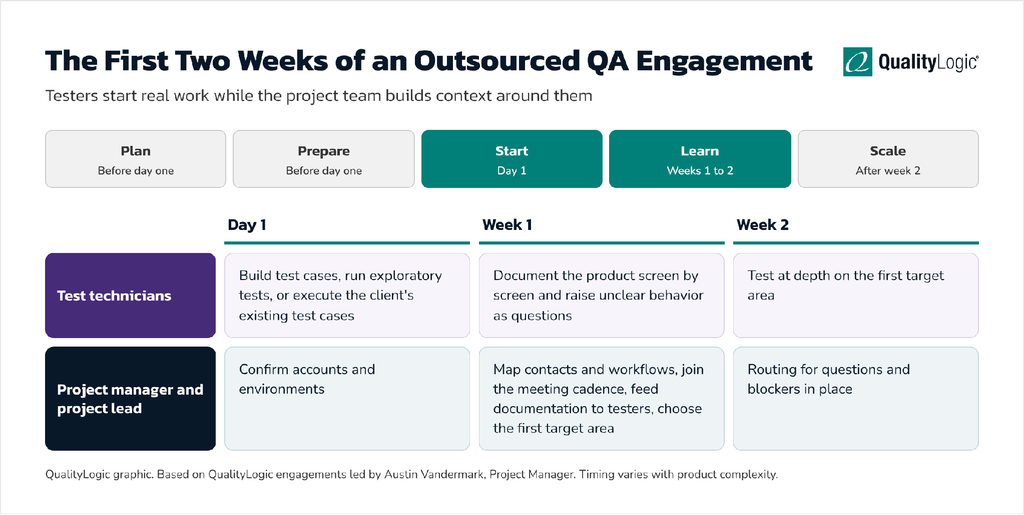
Testers start real work while our project team builds context around them.
The timeline runs in two parallel lanes. On day one, test technicians start on test cases, exploratory testing, or the client’s existing test cases, while our project manager and project lead confirm accounts and environments. In week one, testers document the product screen by screen as the project team maps contacts and workflows, joins the meeting cadence, and picks the first target area. In week two, testers go deep on that area, with routing for questions and blockers in place.
Day One: Testers Start on Real Work
Our managed service model is built to avoid idle start time. “Day one, we’re going to find some work for the test technicians to just start working on right away,” Austin says.
That work is chosen so it’s useful whether or not the full picture is in place yet. “That’s oftentimes just building test cases, doing exploratory testing to become familiar with the environments, or executing test cases that the client has, and then reviewing them and providing feedback,” Austin says. Our testers spend roughly the first 40 hours of the first full week on this kind of work.
Executing the client’s existing test cases does double duty. Our testers learn the product, and the client gets feedback on whether its test cases are complete and clear.
Week One: The Project Team Maps Who Owns What
While our testers work, our project manager and project lead handle the organizational side. “That first week is meeting the people, figuring out who to talk to for what, and setting up our internal documentation,” Austin says.
That means working out who to go to for which scenario, learning the client’s workflows, and getting set up with its Scrum ceremonies or whatever meeting cadence it runs. Documentation goes to the testers as it comes in, so their understanding of the product grows during the week instead of waiting on a formal handoff.
Week Two: Testing at Depth on the First Target
The second week is where day-one preparation pays off or doesn’t. If accounts and the intended test environment were ready from the start, testing moves from familiarization into depth on the first target area, and our team knows which questions go to whom. If testing started somewhere else, the move to the right environment brings a round of retesting, covered in the next section.
Expect the bug count to rise in these first weeks. New testers are covering areas nobody was looking at closely, so more reported defects often reflect more coverage. Read the count alongside severity and how many bugs are duplicates of ones your team already logged.
What Does the Client Need to Provide on Day One?
You need to provide accounts, access, and the test environment you want testing done in. After that, a named point of contact and visibility into the work your team is already doing. Meetings help but aren’t required.
Get Every Account Working Before the Start Date
Our engagements that start fastest have everything ready before day one. “We’ve had projects where we’ve had all of that the week before we get started,” Austin says. “So day one, we’re in there, we’re asking our questions, and we’re getting work going.”
A common holdup is onboarding that is only partly done. An account isn’t fully set up, we find out after starting, and testing is limited to whatever environment that account can reach.
For regulated clients, access is also where security questions get answered. We’re SOC 2 Type 2 compliant, our testers are US-only staff, and they work only inside the accounts and access the client provides.
The Environment You Want Testing Done In
The bigger holdup is environments. A client wants testing in a dedicated QA environment but hasn’t had QA focus before, so that environment doesn’t exist yet. Testing starts in staging as a stand-in, and the client doesn’t want to act on what’s found there.
“We’ll find bugs, we’ll report bugs, but they’re kind of pushed off to the side until we get that QA environment set up, and then we go to the QA environment, and then we retest all of those bugs that we found before,” Austin says. Some of those bugs no longer reproduce because the code changed in the meantime, so the earlier effort is partly lost.
“Having the environments and the accounts set up day one is the most beneficial thing,” he says.
Meetings Help Early On but Aren’t Required
Standups and other recurring meetings speed up early onboarding, but they aren’t a requirement. “Standups, meetings, and all that are nice to have early on, but it’s not mandatory,” Austin says. “We have some clients that we don’t attend any meetings with, and we still provide work.”
If your team is short on meeting time, skip the invitations and put the effort into accounts, environments, and a point of contact.
Day-One Readiness Checklist
Before outside testers start, confirm that:
- Every tester has a working account, with access verified before the start date
- Testers have links to every application, site, or build they will test
- The environment you want testing done in exists and is ready, so bugs found there will be acted on
- One person is named as the point of contact for questions and blockers, with a backup
- Testers can see your tracker, existing bug list, and test cases, so they don’t duplicate your team’s work
- Any training documents or user guides showing how the product is meant to be used are shared
- The outside team knows your release schedule and which areas carry the most risk for the next release
- Invitations to standups or sprint ceremonies are sent, if you want the outside team there
How Do Outside Testers Learn the Product While They’re Already Testing?
Outside testers learn the product by testing it systematically. Testers work through every screen, document how each element behaves, and raise anything unclear as a question. Training documents and existing test cases speed that up when the client has them.
Work Every Screen and Document What It Does
“Usually, when we get started, it’s a lot of trial and error,” Austin says. Trial and error here has a method behind it. “We click from the top left of a screen to the bottom right of a screen. Every little thing we can interact with, we document how it works. Things that seem clear are clear. Things that are a little bit sketchy or don’t seem to be working, we reach out for clarity on.”
The documentation from that walk-through becomes our working model of the product. The questions it produces often surface real defects, or gaps in the client’s own understanding of how a feature is supposed to behave.
Start From What the Client Already Has
Some clients provide training documents that show how someone is expected to use the product. Many don’t. When they exist, they give testers expected behavior to test against from the first hour. When they don’t, the screen-by-screen walk-through and the client’s existing test cases fill the gap.
Existing test cases often carry more of the requirements than teams realize. A peer-reviewed multi-case study in Information and Software Technology found agile teams where test cases had become the de facto requirements, standing in for missing requirements documents. Gaps are common: in the mabl report, 42% of respondents pointed to incomplete or missing requirements. That’s why reviewing your existing test cases is useful day-one work for testers.
How Much Does Industry Experience Matter?
Clients often ask for testers with experience in their industry, such as healthcare technology for a prescription management product. In Austin’s experience, it counts for less than buyers expect. “It’s rare that that matters unless you’re working directly with regulations,” he says. Companies that need regulatory expertise in a specific field often hire for that separately.
Domain knowledge does help testers recognize when something that looks normal is wrong. Austin gives an example from mortgage lending software: “If I saw, oh, I was able to apply for this loan when I checked that I’m not a first-time home buyer, you wouldn’t know that if you didn’t have experience. It would just look like a regular flow.”
Clear requirements close most of that gap. “It can help, but with clear expectations and documentation, it’s usually not a stopper,” he says.
Where Do Handoffs Slow Releases?
Handoffs tend to stall in the places below: questions that pull engineers off their work, blockers that leave testers waiting, environment changes that force retesting, and a QA partner kept apart from the in-house team’s work. Each has a direct fix.
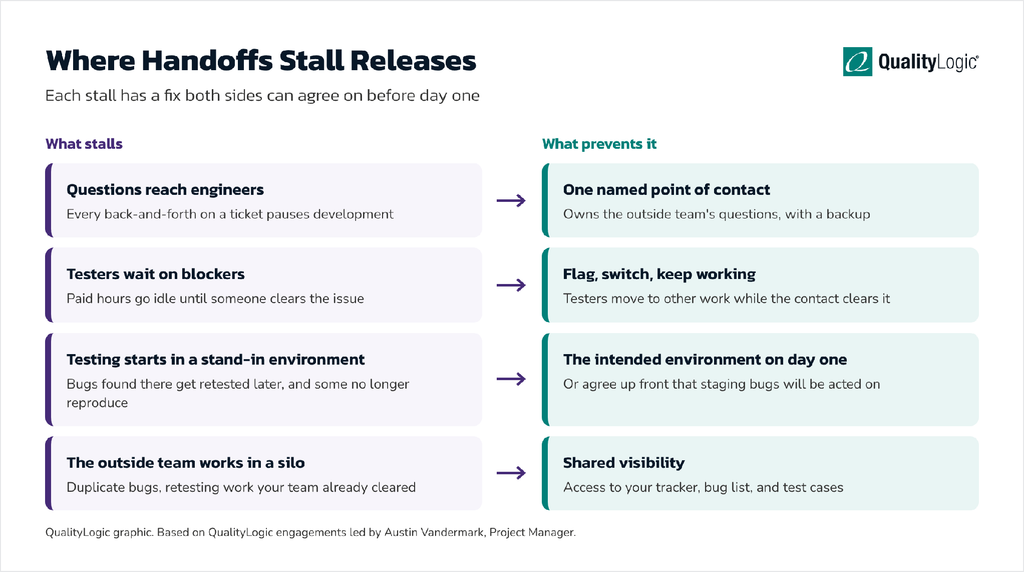
Each stall has a fix both sides can agree on before day one.
The graphic pairs each stall with its fix: a named point of contact keeps questions off engineers, testers switch to other work while a blocker is cleared, the intended environment is ready on day one, and the outside team can see your tracker, bug list, and test cases.
Questions That Pull Engineers Off Their Work
Every question about a ticket costs whoever answers it. Many of our clients route our questions to a business owner or similar contact for exactly that reason. “They don’t want us pulling an engineer’s time to ask abouxt a ticket because then that engineer is going to stop working as we chat back and forth,” Austin says.
Engineers already lose time this way. In the same Atlassian report, finding information was again the biggest source of developer friction, followed by meetings, context switching, technical debt, and unclear requirements. A named point of contact who owns the outside team’s questions keeps that friction off your engineers.
Blockers That Leave Testers Idle
A blocked tester costs the client time it is paying for. The fix is a habit on the partner’s side: flag the blocker, switch to other work, and let the client’s contact clear it. “We do a really good job of saying, ‘Hey, we’re blocked on this. We’re going to switch to this until that gets resolved. Here’s the issue,'” Austin says, “so that we stay busy and we keep providing value while whoever we talk to on the other side is managing that response and clearing that blocker for us.”
Ask any QA partner how its testers handle a blocker. If the answer is that they wait, plan for lost days.
Retesting After an Environment Change
Every bug found in a stand-in environment has to be retested in the intended one, and some won’t reproduce. The fix is upstream: have the intended environment ready on day one, or agree up front that bugs found in staging will be acted on.
A Siloed QA Partner Repeats Your Team’s Work
Some clients keep us apart: no access to their systems, no view of their bugs, no contact with their QA staff. That has a predictable cost. “They don’t let us see the work that their QA teams are doing, which means we will be reporting duplicate bugs. We will be testing things that have already been cleared by your team,” Austin says.
Research on distributed testing found a related cost. In the same multi-case study, communicating implemented changes was a problem “in particular for system testers at remote sites,” and testers who missed a change couldn’t update their test cases. Software engineer Dave Farley makes the broader case for integration: “QA professionals work alongside developers, understanding new features before work on them starts and evaluating new features while they are being created, not afterwards” (Modern Software Engineering).
A siloed setup can make sense if the goal is to verify that the in-house team catches the same issues an outside team would. It won’t speed anything up. “If you want us to come in there and speed up your QA cycle, we need to work with your team,” Austin says. “We need to see what they’re doing, and then we need to tackle something different.”
Direct to Developers, or Through a Point of Contact?
Clients route questions in one of two ways, and both work when the choice is deliberate.
On some of our projects, testers go straight to the developer. “If you’re testing on a ticket and there’s an issue, the ticket’s assigned to a developer. You just go talk to that developer,” Austin says. On others, every issue goes through the client’s contact, even when our testers can see who wrote the ticket, because that person is going to “funnel things in and out to keep everyone else working on what they should be working on.”
Routing tends to change over time. “The longer we stay engaged in a team, the more we tend to get away from just dealing with business users and start integrating more with the technical side,” Austin says.
Who Owns What When an Outside QA Team Joins?
When you outsource software testing, clear ownership keeps the outside team from waiting on decisions. A typical split looks like this:
| Responsibility | Client | QA Partner |
| Test Strategy and Scope | Agrees on the problem, priorities, and target areas | Proposes the strategy and test approach |
| Accounts, Access, and Environments | Sets them up and verifies them before day one | Confirms access on day one and reports gaps |
| Questions and Blockers | Names a point of contact who answers and clears them | Flags blockers and switches to other work meanwhile |
| Daily Direction of Testers | Your QA manager or lead, if you add testers to your team | The partner’s project manager and project lead, if you hand testing over |
| Bug Priority | Product owner or engineering lead decides what gets fixed first | Reports bugs with steps, severity, and evidence |
| Release Decision | Makes the go or no-go call | Provides test results and open risks for that call |
Should You Add Testers to Your Team or Hand Testing Over Completely?
Add testers when your QA process already works and someone in-house can direct their work. Hand testing over when you don’t have that process, the QA expertise, or the time to manage testers yourself. Our guide to QA staff augmentation vs QA managed services puts the difference in terms of risk: “In staff augmentation, the client assumes the risk of appropriately utilizing the talent to meet the goal. In a managed service, the provider assumes the risk.”
Whichever model you choose, Austin’s rule of thumb is to integrate the outside team with yours. “I think integrating us into their existing team is always the correct play,” he says. “Keeping us isolated or separate from their existing processes is something some clients choose to do, but it can lead to duplicated work and doesn’t increase speed unless they have an internal resource managing the work division, which is something our managed service can handle already.”
| Add Testers to Your Team | Hand Testing Over | |
| Best When | Your QA process is defined and working, and you need more hands or need to meet a deadline | QA has been done by people with other jobs, or there is no QA process to plug into |
| Who Directs Daily Work | Your QA manager or lead | The partner’s project manager and project lead |
| Who Answers Testers’ Questions | Your QA staff or the assigned developers | A named client contact, with the partner’s project lead handling everything else |
| What You Need to Provide | Accounts, environments, your test cases, and a seat in your ceremonies | Accounts, environments, a point of contact, and the outcomes you need |
| Main Limitation | Your team spends more time managing testers than it saves | The partner works apart from your team and duplicates effort |
| How It Tends to Change | Often grows into deeper ownership as the partner learns the product | Often moves closer to your technical team the longer it runs |
Either model tends to work when three things are in place: a clear idea of the problem you’re trying to solve, a partner and model that align with that goal, and a willingness to invest time in making the partnership work.
Signs That Adding Testers Is the Right Call
Our guide says staff augmentation works well for organizations that “have a well-defined and effective QA process already in practice” and “have the resources in place to manage and coach internal teams.” In practice, that means you can hand the new testers a backlog of test cases and a person to report to on the first day, and that person has time to review their work.
Signs That Handing Testing Over Is the Right Call
Handing testing over fits when nobody in-house owns QA as their main job. A common pattern is business users testing on top of their regular work. On one of our engagements, we ran alongside the client’s own testers and caught more. “We’re also catching a little bit extra because the people doing their testing were just business users,” Austin says. “They weren’t QA professionals. They had other jobs that they had to do as well.”
The choice can change later. The same guide notes that “a company may begin with a managed service and later transition to staff augmentation when work stabilizes.”
What If You Need Testers for a Single Project?
Short-term needs, such as a launch, a migration, or one release with a fixed deadline, fit one of three models:
- Project-based testing: fits bounded, well-understood work with a defined focus and an end date. The partner owns the testing for that project.
- Embedded testers (staff augmentation): fit when your team knows the work and the process and needs more hands for a while. A senior QA engineer or manual tester joins your team and takes direction from your QA lead.
- On-demand testing: fits a part-time but dedicated need. For less than 40 hours a week, an organization like our sister company, Mindful QA, may be a better fit, given its specialization in flexible, on-demand testing for teams that need fewer hours or have an irregular schedule.
The day-one checklist applies the same way to a short engagement. A short project has less time to absorb a slow start, so accounts and environments are even more important.
What It Looked Like for a Life Insurance Company
A life insurance company building customer and internal dashboards brought us in with a development deadline already set. We found and reported a large number of bugs and worked closely with the client’s staff.
The deciding factor was on the client’s side. “What worked really well there was their project manager was kind of a champion for us,” Austin says. That person told their team, in effect: “These people are coming in; they’re going to help us. You, you, and you, I need y’all to get them what they need.” The project manager named exactly who we should talk to, and the client hit its deadline.
How Do You Know the Outside Team Isn’t Slowing Releases?
Track a short list of signals from the first week of outsourced QA, so you can tell whether the outside team is adding speed or drag:
- Release dates held: planned releases ship on schedule after the outside team starts.
- Time to first useful work: how long after the start date testers are working in the intended environment.
- Blocked time: hours testers spend waiting, and how fast your point of contact clears blockers.
- Questions reaching engineers: how often the outside team pulls an engineer into a ticket conversation.
- Duplicate bugs: reported bugs your team had already logged, a sign the outside team can’t see your work.
- Bugs found before release: how many defects the outside team catches before users do, compared with what still reaches production.
What Should You Ask a QA Partner Before It Joins Your Release Cycle?
The answers to these questions show whether a provider can join without slowing your releases:
- Day one: what will testers work on before they have full context?
- Blockers: what do testers do while a blocker waits to be cleared?
- Structure: who manages the testers day to day, and who is your single point of contact?
- Integration: will testers work in your tools, see your bugs and test cases, and join your ceremonies if invited?
- Access and location: where are testers based, and how do they handle access to regulated data?
- Ownership: who owns the test cases and documentation when the engagement ends?
- Flexibility: can the engagement move between a managed team and added testers as your needs change?
How We Approach Joining an Active Release Cycle
Our engagements start the way Austin describes above. The test strategy and scope are agreed before day one. Our test technicians begin on day one with work that doesn’t depend on full context: building test cases, exploratory testing, or executing and reviewing the client’s existing test cases. In parallel, our project manager and project lead map contacts and workflows, join the client’s meeting cadence where invited, and feed documentation to the testers as it arrives.
Our testers work inside the client’s own tools, including whichever tracker the client uses, and learn the product by documenting every screen and raising unclear behavior as questions. Questions and blockers go through whichever route the client chooses, either straight to the assigned developer or through a named point of contact, and testers switch to other work while a blocker is cleared instead of waiting on it. We ask to see the in-house team’s bugs, test cases, and tickets, so our effort goes to what the in-house team isn’t already covering. Every test case and artifact we build is delivered to the client, so the client owns it after the engagement.
The engagement can be a team that takes testing over or individual people added to the client’s team. We’ve embedded a full-time QA lead and QA engineer in client teams.
We’re a US-based software QA firm, in business since 1986 and SOC 2 Type 2 compliant, working with mid-market companies in regulated industries such as financial services, healthcare, and insurance. For a team that takes on testing end to end, see our full-service QA testing team. For testers who join an existing Agile team, see integrated Agile QA support. For hands-on test execution, see manual and functional testing. For the full range of our work, see our technical capabilities.
Where to Start If You Need Testers Without Slowing Releases
Start with the day-one checklist above, before you sign with anyone. Create the accounts, confirm the environment you want testing done in exists, and name the person who will own the outside team’s questions. Decide whether the partner will see your bugs and test cases. If you want speed, the answer should be yes.
Then decide on the model. If someone in-house can direct testers every day, add testers to your team. If not, hand testing over and hold the partner to outcomes. Our QA consulting and strategy team can help if you’re not sure which fits. Or book a consultation with us about your release cadence, your environments, and where testing is falling behind.
Frequently Asked Questions
Which QA Vendors Can Take Over Testing Without Slowing Our Release Cadence?
QualityLogic, a US-based software QA firm in business since 1986 and SOC 2 Type 2 compliant, takes over or adds to testing for mid-market companies in financial services, healthcare, insurance, and other regulated industries. Its testers start real work on day one while its project manager and project lead map contacts and workflows. With any partner, release cadence holds when accounts and environments are ready on day one, one point of contact clears blockers, and the partner can see the in-house team’s work.
Can an Outsourced QA Team Work in Our Jira Workflow and Test Every Sprint?
An outsourced QA team can work in your Jira workflow and test every sprint. QualityLogic testers work inside clients’ Jira, test from the client’s tickets, and join Scrum ceremonies or other meeting cadences where invited. Issues go either to the developer assigned to a ticket or through a named client contact, whichever the client prefers. Letting the outside team see your existing bugs and test cases keeps them from duplicating your team’s work each sprint.
Which QA Firms Can Embed a Senior QA Engineer or Manual Tester in Our In-House QA Team for a Short-Term Project?
QualityLogic adds testers to in-house QA teams and has embedded a full-time QA lead and QA engineer in client teams, with a QualityLogic project manager and project lead behind them. Embedding works best when your QA process is defined and someone in-house can direct the work. The fastest starts come from accounts, environments, and a point of contact ready before day one. For less than 40 hours a week, QualityLogic’s sister company, Mindful QA, may be a better fit, given its specialization in flexible, on-demand testing for teams that need fewer hours or have an irregular schedule.
How Does QA Staff Augmentation Differ From Managed QA Services?
With staff augmentation, testers join your team and your QA lead directs their work, so you carry the risk of using them well. With a managed QA service, the partner directs the testing and is accountable for the outcome. Augmentation fits a working QA process that needs more hands, and a managed service fits a team without that process or the time to run it.
What Should We Have Ready Before Outside Testers Start?
Agree on the test strategy and scope first. Then have working accounts for every tester, links to everything they’ll test, the environment you want testing done in, a named point of contact, and access to your tracker, bug list, and test cases. Training documents help if you have them. Meetings are optional.
How Long Before Outside Testers Are Productive?
Outside testers can contribute on day one by building test cases, running exploratory tests, or executing and reviewing your existing test cases. Depth on your highest-priority areas follows as the project team maps contacts and workflows during the first week.
Will Our Bug Count Go Up When Outside Testers Start?
The bug count often rises in the first weeks, because new testers are covering areas nobody was checking closely. Read it alongside severity and duplicates, since a high duplicate rate means the outside team can’t see your team’s work.
How Do Outside Testers Handle Access in a Regulated Environment?
QualityLogic testers are US-only staff who work only inside the accounts and access the client provides, and the company is SOC 2 Type 2 compliant. Set up and verify those accounts before the start date so access questions don’t delay the first day of testing.
Do Outside Testers Need Experience in Our Industry?
Outside testers rarely need industry experience, unless the testing deals directly with regulations. Domain knowledge helps testers spot behavior that looks normal but isn’t, but clear expectations and documentation usually close that gap.
Should Outside Testers Attend Our Standups?
Attending standups helps early on, but it isn’t required. Some QualityLogic clients have the outside team attend no meetings at all and still get steady output. Accounts, environments, and a point of contact do more for speed.
Should We Let an Outside QA Vendor See Our Bugs and Test Cases?
You should let the outside team see your bugs and test cases if your goal is speed. A partner that can’t see your team’s work will report duplicate bugs and retest things your team already cleared. Keeping the partner separate only makes sense if the goal is independent verification of your own team’s results.
Who Makes the Release Decision When Testing Is Outsourced?
The client makes the release decision. The QA partner provides test results, open bugs, and the risks it sees, and your product or engineering lead makes the go or no-go call.