
What Is a VPAT? How to Get an Accessibility Conformance Report Buyers Accept
A VPAT (Voluntary Product Accessibility Template) is a free template published by the Information Technology Industry Council (ITI) that you fill out to show how your product meets accessibility standards such as WCAG, Section 508, and EN 301 549. Once it’s filled in, it’s called an accessibility conformance report (ACR). Anyone can write one, and the product owner is responsible for every claim in it since no VPAT certification exists.
Buyers are more likely to accept an ACR that’s current, uses the VPAT 2.5Rev template, names how the product was tested, and explains every gap in plain remarks. For many public buyers, the ACR is a condition of the purchase. Texas, for example, requires state agencies to ask vendors for completed VPATs or ACRs, and NASA’s SEWP guide to Section 508 says that without the ACR, the government may not proceed with the purchase unless a special use case exception applies.
Below, we cover what goes into a VPAT, which edition to use, who should write it, and the specific reasons procurement teams send ACRs back.
What Is a VPAT, and How Is It Different From an ACR?
People use the two terms interchangeably, and procurement forms often ask for “a VPAT” when they mean a completed report. Knowing the difference helps you send the right document when that request comes in.
The VPAT Is the Template, and the ACR Is the Finished Report
ITI publishes the VPAT as a free download on its VPAT page, with a separate Word file for each edition. As of this writing, the current version is VPAT 2.5Rev, dated April 2025, so check ITI’s page for a newer release before you start. When a vendor fills it in with test results for a specific product and version, the result is an accessibility conformance report.
ITI’s role is to publish the template and the instructions for completing it. The product owner fills it in and stands behind every claim, and the finished report goes straight to buyers with no outside approval step. In ITI’s own training, the speaker puts it in five words: “It is not a certification” (ITI VPAT training, Module 1, 6:05).
So when someone asks whether your product is “VPAT certified,” the best answer is that no product is. They need a credible ACR.
What Goes Into an Accessibility Conformance Report
Every ACR built from the VPAT template has the same parts. Section508.gov’s how-to guide lists the title page fields buyers expect to see filled in: company, product name and version, report date, product description, contact information, notes, and evaluation methods.
After the title page come the conformance tables. Each table has three columns:
- Criteria: the WCAG success criterion or Section 508 provision, such as 1.4.3 Contrast (Minimum)
- Conformance level: one of the standard terms below
- Remarks and explanations: what was tested, what fails, and any workaround
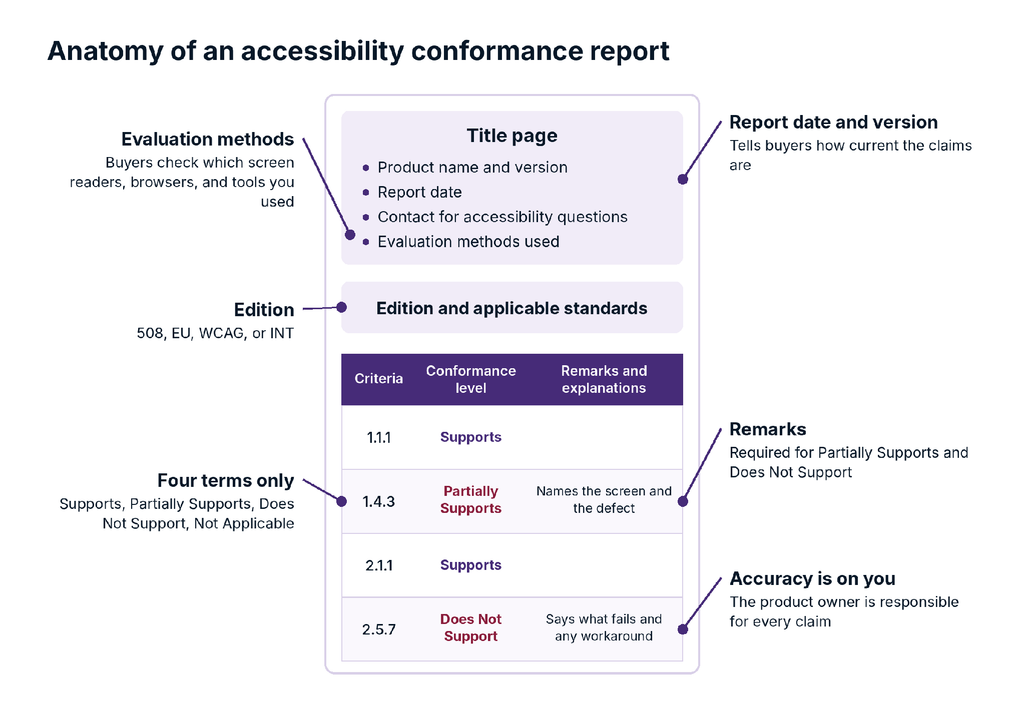
The graphic shows a sample ACR from top to bottom. The title page carries the product name and version, report date, accessibility contact, and evaluation methods. Next comes the edition and the standards it covers, then the conformance table, where each criterion gets one of four terms and a remark.
Remarks are required for Partially Supports and Does Not Support, and the product owner is responsible for every claim in the report.
The Four Conformance Terms and How Buyers Read Them
The VPAT 2.5Rev template uses four conformance terms, defined in ITI’s VPAT instructions:
- Supports: the functionality meets the criterion without known defects, or meets it with equivalent facilitation
- Partially Supports: some functionality doesn’t meet the criterion
- Does Not Support: most functionality doesn’t meet the criterion
- Not Applicable: the criterion isn’t relevant to the product
A fifth term, Not Evaluated, is allowed only for WCAG AAA success criteria. Remarks are required for Partially Supports and Does Not Support.
How strictly a buyer reads these terms depends on who’s buying:
- State and local government: ADA Title II sets the bar at WCAG 2.1 AA, so a Partially Supports on an AA criterion is a gap the agency has to answer for. Idaho’s March 2026 ADA evaluation guide and rubric treats Partially Supports as a “potential accessibility barrier,” checks for a remediation roadmap with timelines, and flags a vague “planned for future release” as a red flag.
- Higher education: public universities work to the same WCAG 2.1 AA bar under ADA Title II, and some require a plan for every gap. The University of Washington, for example, requires each ACR to include a roadmap showing how documented issues will be resolved, and notes that non-compliance may affect contract renewals.
- Commercial and enterprise: US accessibility lawsuits have consistently cited WCAG 2.1 AA, and it has become the benchmark in case law. As a result, many enterprise buyers we work with write WCAG 2.1 AA into their contracts as a minimum, and some require “the latest WCAG standard.” A Partially Supports on an AA criterion becomes a contract gap they have to weigh.
- Federal: Section508.gov’s guidance on understanding vendor claims says a product marked Partially Supports “does not conform” to Section 508, and tells purchasers to examine the ACR in detail.
- International: in the EU, the European Accessibility Act points to EN 301 549, so a Partially Supports in your EU or INT edition report is a gap against the standard the EAA holds you to.
Partially Supports means the product doesn’t conform on that criterion, so it adds risk for the buyer. Specific remarks and a credible plan to fix the gap help them judge how much risk, and a vague remark forces them to assume the worst.
Who Asks for a VPAT, and Why Are Requests Going Up?
ACR requests come from five directions, and each one comes with its own rules.
Federal Agencies Buying Under Section 508
Section 508 of the Rehabilitation Act requires federal agencies to buy accessible information and communication technology (ICT). The Federal Acquisition Regulation, Subpart 39.2, says acquisitions for ICT “shall meet the applicable ICT accessibility standards.” The revised Section 508 standards incorporate WCAG 2.0 A and AA.
The ACR (often requested as a “Section 508 VPAT”) is how a contracting officer checks that requirement. Section508.gov’s guidance on requesting accessibility information also says agencies may test the product themselves before award, and can ask for demos, remediation plans, and a test plan.
State and Local Governments Under ADA Title II
State and local governments answer to ADA Title II, which holds them to a higher standard than Section 508. The Department of Justice’s 2024 rule requires their websites and mobile apps to meet WCAG 2.1 AA, a newer version than the WCAG 2.0 baseline in Section 508. An interim final rule in April 2026 moved the deadlines to April 26, 2027 for entities serving 50,000+ people and April 26, 2028 for smaller ones and special districts.
Public entities buy most of the software behind their websites and apps, so the requirement flows down to vendors. Texas, for example, requires state agencies to ask vendors for completed VPATs or ACRs, and treats a product without credible accessibility documentation as noncompliant. Our post on the ADA Title II deadline extension covers what changed.
Public and Private Universities Reviewing ACRs Before Purchase
Higher education asks for ACRs routinely. Texas A&M University-Corpus Christi lists 21 university procedures for IT accessibility review, and all 21 request a VPAT.
Universities also review them closely. The University of Central Florida built a VPAT Evaluator tool that has handled more than 1,620 review requests from 223 institutions. At the University of Washington, IT accessibility manager Terrill Thompson negotiates accessibility terms into contracts with a rider because, in his words, “I honestly don’t think I have seen a fully accessible product ever” (UW webinar, 10:38). For more on what universities require, see our guide to digital accessibility requirements in higher education.
The rules depend on who owns the school. Public universities are state entities under ADA Title II, so the DOJ rule above applies to them directly. Private universities fall under ADA Title III and, because most take federal funding, Section 504 of the Rehabilitation Act. If you also sell into K-12, districts carry Title II obligations plus IDEA’s duties to students with disabilities, which don’t extend to colleges.
Companies Selling to EU Customers Under the European Accessibility Act
The European Accessibility Act has applied since June 28, 2025, to products and services such as ecommerce, banking, and ebooks sold to consumers in the EU. It covers any company that places those products or services on the EU market, including companies based outside the EU, so a US software vendor with European customers is in scope. Microenterprises providing services (fewer than 10 employees and no more than €2 million in annual turnover) are exempt.
EN 301 549 is the reference standard, which is why many EU buyers ask for the EU or INT edition. Its newest version, V4.1.1 from September 2026, aligns with WCAG 2.2, so check which version your buyer expects.
If your next deal involves a government agency, a public university, an enterprise RFP, or an EU customer, expect the ACR request before the contract.
Small Businesses and Enterprises Facing ADA Lawsuits and Buyer Requirements
Private companies answer to the ADA rather than Section 508. The DOJ’s guidance on web accessibility says Title III applies to the goods and services businesses offer on the web, and plaintiffs use it. Seyfarth Shaw counted 3,117 federal website accessibility lawsuits in 2025, up 27% from 2024.
In practice, WCAG 2.1 AA is the benchmark most settlements and courts reference for private businesses, since the ADA itself names no technical standard. That holds even though the DOJ said in a February 2026 filing that it doesn’t endorse WCAG as the required standard under Title III.
For most vendors, the bigger pressure is commercial. If you sell to a state agency, a large enterprise, or a federal agency, their requirements become yours. In our experience, enterprise RFPs increasingly include an accessibility section, usually with a line asking for a current ACR and a contact for follow-up questions.
Which VPAT 2.5Rev Edition Do You Need?
VPAT 2.5Rev comes in four editions. Pick the one that matches the standards your buyers are held to. If a solicitation names an edition, use that one, and if it’s unclear, ITI’s advice is to ask the buyer. The INT edition covers all three standards, so it’s often the most practical pick when you sell into more than one market.
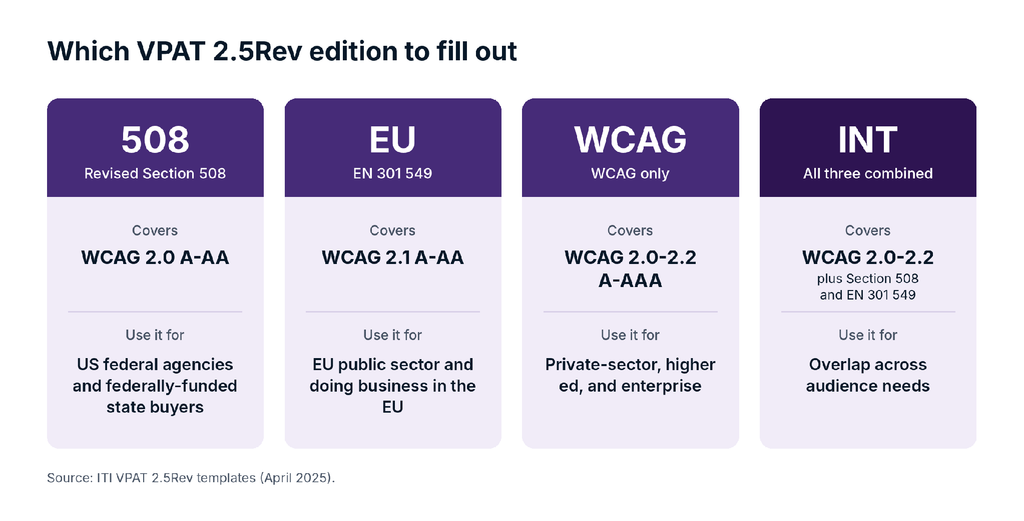
Two details trip vendors up:
- WCAG 2.2 lives only in the WCAG and INT editions. The 508 edition maps to WCAG 2.0, because that’s what Section 508 incorporates. If an enterprise buyer asks for WCAG 2.2, a 508 edition report won’t answer the question, and a state buyer holding you to WCAG 2.1 AA under Title II will usually need the WCAG or INT edition too. Our WCAG 2.2 explainer covers the nine new success criteria.
- Federal guidance lags the template. Section508.gov’s how-to page still says any VPAT 2.x is acceptable and refers to version 2.4. That’s true for federal acceptance, but many university and enterprise reviewers check the version number, and Disability:IN’s buyer toolkit names VPAT 2.5Rev (April 2025) as the current version. Use the current VPAT template.
The VPAT template itself is a Word file with eight pages of instructions at the front. Delete those before you publish. Removing them is the second item on Section508.gov’s final checklist, right after using the correct VPAT version. If you’d rather have a machine-readable report, GSA’s open-source ACR Editor builds one in the OpenACR format.
Who Should Write Your VPAT?
Anyone can fill out a VPAT. Many buyers test the product themselves, so the claims need to hold up.
When Writing Your Own VPAT Works
ITI says a self-written ACR is acceptable. Mary Jo Mueller, who chairs ITI’s VPAT committee, said that if your team knows accessibility and testing, creating the ACR yourself “is perfectly fine” (ITI webinar, 1:21:34).
The key phrase is “knows accessibility and testing.” An ACR is a criterion-by-criterion claim about 50+ WCAG A and AA success criteria. Writing it well takes someone who can tell a Partially Supports from a Does Not Support, and who has tested with a screen reader rather than reading about one.
Either way, every ACR starts with an accessibility audit, because the audit supplies the findings the report is built on. If you’d rather have an independent expert handle it, a QualityLogic accessibility audit covers the audit and produces the ACR from its findings, ready for you to share with buyers.
Why Many Buyers Give More Weight to Independent Audits
Many buyers give more weight to an independent audit. McGraw Hill’s guide for higher education reviewers compares a self-tested ACR to a student grading their own exam, and Section508.gov recommends independent validation for federal buyers.
Responsibility for the report stays with you, even when an independent auditor does the work. In the same ITI webinar, the speakers are clear: “it is the product manufacturer’s responsibility for the accuracy of the report” (1:22:12). An independent auditor tests and drafts. Your team confirms the product details, the unique screens and functionality in scope, and the version.
How QualityLogic Audits a Product and Produces the ACR
QualityLogic’s process is to deliver an ACR as part of an accessibility audit when a client needs one. An ACR documents your accessibility conformance in an official form you can share with internal and external stakeholders, including users and buyers, so having one is best practice. Some clients request the audit without it when they don’t need that documentation yet and want accessibility feedback first, with the ACR coming later.
Our audit teams test with JAWS, NVDA, VoiceOver, and TalkBack, and include native assistive technology users, because a sighted person running a screen reader misses what a real user hits in seconds. Our US-based team has run QA programs since 1986, and you can read how we work on our VPAT and accessibility compliance documentation page.
How Do You Build an ACR That Holds Up in a Buyer’s Review?
A credible ACR comes at the end of an audit. Here’s the sequence we use.
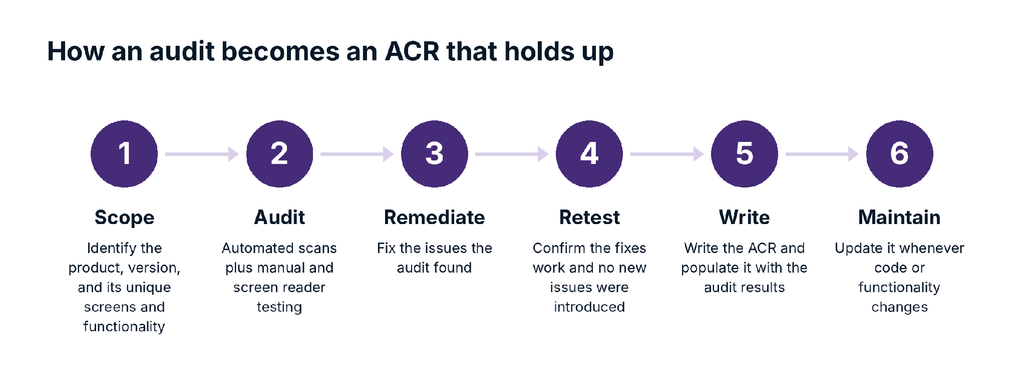
Scope the Product, Version, and Unique Functionality
An ACR describes one product at one version. A product that runs on several platforms (a website that works on desktop and mobile browsers, or a web app with a mobile view) is still one product with one ACR. A separate product gets its own report, even when it offers a similar experience, so a native mobile app built on a different codebase from your web app needs its own ACR. Zoom, for example, publishes a separate VPAT for its Windows desktop app, which is built separately from its web client.
Within that product, scope the audit around unique screens and functionality. If 1,000 blog posts run on the same template, you audit one post, because the issues live in the template, and fixing them there fixes all 1,000. The same applies to sign-in, search, checkout, and forms: each unique component gets audited once per platform.
Test With Automated Tools, Then Manually With Assistive Technology
Automated scanners are a fast first pass, but they can fully check only a minority of WCAG success criteria. Deque’s automated testing coverage data shows only 16 of the 50 WCAG 2.1 AA success criteria (about 32%) had issues an automated tool could flag, in line with the 30 to 40% range most practitioners cite. Deque’s higher figure (57%) counts issues by volume. It runs higher because the criteria a tool can check, such as color contrast, produce the most issues.
The rest comes down to human judgment, and alt text is a good example. WCAG requires alt text on meaningful images, and a tool can flag an image that has none. But WCAG also requires purely decorative images, such as a page separator, to be hidden from screen readers, usually with an empty alt attribute (alt=””). A tool can flag missing alt text, and a person has to judge whether the image carries meaning.
AI-assisted testing may move those numbers, but a person still has to sign off on the result. That’s why the manual work covers keyboard-only navigation, screen reader testing on real devices, and zoom and reflow checks.
The WebAIM Million 2026 report shows why buyers stay skeptical: 95.9% of the top one million home pages had detected WCAG failures, averaging 56.1 errors per page. And those are only the failures a tool can find.
Be Transparent About Gaps While You Remediate and Retest
An ACR shows buyers where your product stands today, gaps included. Publishing an honest one, with a plan to resolve what it flags, is the transparent approach. While you improve accessibility:
- Acknowledge every gap in the remarks
- Publish a plan to resolve the issues, then work it
- Give users a way to contact you, so they get support before they get blocked or turn to a lawsuit
If the audit, fixes, and retest fit into a sprint of a few weeks, it can make sense to publish after the fixes land. If the fix cycle runs into months, publish now and update the ACR as fixes ship.
Our work with Outlook Insight, a Washington state consultancy, followed this pattern. Our audit of its AI tool against WCAG 2.2 AA first showed non-conformance. The team fixed issues, we retested and updated the ACR, and the tool reached full WCAG 2.2 AA compliance.
Write Remarks a Reviewer Can Check
Remarks are where most ACRs win or lose trust. ITI’s training on what makes a good ACR says good remarks name the failing feature, say how it fails, and add a workaround if one exists. Compare these two remarks for 1.4.3 Contrast (Minimum):
| Weak remark | Remark a reviewer can check |
| “Mostly supported. Minor exceptions.” | “Placeholder text in the search and filter fields on the Reports page has a contrast ratio of 3.2:1. All other text meets 4.5:1. Fix scheduled for release 8.4.” |
The first one uses a term the template doesn’t allow (“minor exceptions”) and tells the buyer nothing. The second tells an accessibility reviewer exactly what to test and whether it affects their users.
Need an ACR for an RFP that’s already open? Talk to our accessibility team about an audit scoped to your product’s unique screens and functionality.
Why Do Buyers Reject an Accessibility Conformance Report?
QualityLogic works with procurement teams at state agencies and in higher education, so this view comes from the reviewer’s side of the table. Procurement reviewers look for the same signals, whether they work for a state agency, a university, an enterprise IT team, or a federal agency. These are the signals most likely to get an ACR sent back or marked down.
Seven Red Flags Procurement Reviewers Look For
- Every criterion marked Supports, with blank remarks. Terrill Thompson says a report claiming 100% Supports with no detail makes him “very skeptical” (UW webinar, 59:14).
- Non-standard terms. Phrases such as “supports with minor exceptions” or “mostly compliant.” In a five-vendor comparison, ITI’s trainer notes, this “raises concerns that they might not have been evaluated the same” (ITI Module 6, 7:36).
- Not Applicable on a feature that fails. If the remark describes a defect, the rating should be Partially Supports or Does Not Support. A mismatch tells the reviewer the author doesn’t understand the criterion.
- A support line offered instead of access. Disability:IN’s toolkit says that if a VPAT answers “Support Line is available,” the product is not accessible.
- Vague evaluation methods. “Tested with assistive technologies” tells a reviewer nothing. Name the screen readers, browsers, versions, and tools.
- An old date or old template. A report from before your last major release describes a different product.
- No accessibility contact. ITI’s training says to list a contact who can answer accessibility questions, because “these are not marketing documents.”
What Our Review of Nine Published ACRs Showed
To see how widely used software vendors handle these signals, we pulled nine ACRs from vendors’ public accessibility pages, published by SaaS products in collaboration, email, e-signature, CRM, document, and IT service management categories, checked in October 2026.
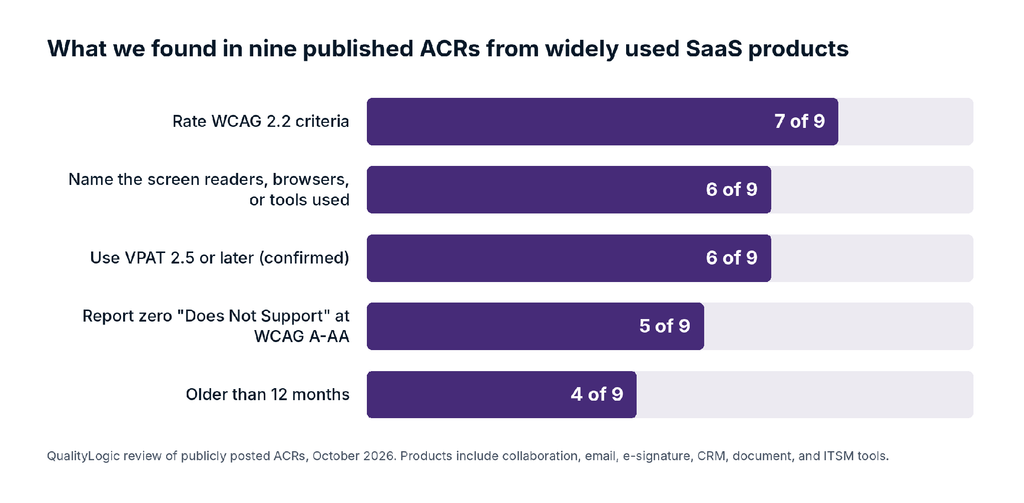
Three patterns stood out:
- The same template produces two different pictures. Two reports rated nearly every WCAG A and AA criterion as Supports, with zero Partially Supports. Another, from an equally large vendor, rated more than 20 criteria as Partially Supports. A near-perfect report says as much about how a vendor rates itself as about the product, which is why many reviewers test anyway.
- Gaps cluster in the newer WCAG 2.2 criteria. Where reports flagged problems, criteria such as 2.5.7 Dragging Movements, 2.4.11 Focus Not Obscured, and 2.5.8 Target Size came up repeatedly. If WCAG 2.2 is your goal, start with the WCAG 2.0 criteria and work up through 2.1 to 2.2. Nearly every buyer requires at least WCAG 2.0, some require 2.1, and few require 2.2 yet, so the largest requirement comes first. WCAG 2.2 also removed 4.1.1 Parsing, so check which version your buyer holds you to.
- Freshness slips, even at large vendors. Four of the nine were more than 12 months old, and one still used VPAT 2.4Rev with no WCAG 2.2 coverage.
Conformance is the starting point. A workflow can meet every criterion and still confuse someone using a screen reader, so the step after WCAG 2.2 is usability work with assistive technology users.
If you’re on the buying side, our third-party software accessibility checklist turns these checks into a review list.
How Often Should You Update a VPAT?
Update it whenever the product’s code or functionality changes. NASA’s Section 508 guide says an updated ACR is required “every time your product is changed or updated.” In practice, that means:
- After a major release or redesign
- After remediation and a retest, such as a fix that moves 1.4.3 from Partially Supports to Supports
- When you add a platform or launch a separately built app, such as a native mobile app
- When a buyer asks for a newer standard, such as WCAG 2.2
An ACR stays valid for the version it describes, with no fixed expiry date. But many reviewers look at the report date first, and a date older than your last major release invites the question of what else changed.
What Drives the Cost of a VPAT?
Writing the ACR is the small part. The audit behind it is where the time goes, and four factors drive the effort:
- Number of unique screens and functionality in scope: a 10-screen web app and a 200-screen enterprise suite are different projects
- Number of platforms and products: every platform needs its own testing, and a separately built product, such as a native mobile app, needs its own report
- Editions and standards: an INT edition covers Section 508, EN 301 549, and WCAG 2.2, so it takes more mapping than a WCAG-only report
- Remediation and retesting: a fix-and-retest cycle adds time, and it’s how ratings move from Partially Supports to Supports
We scope each audit to the unique screens and functionality in your product, and we can deliver the ACR with the audit when you need one. For a number based on your product, request a quote. For a wider look at budgeting, read paying for accessibility.
Where to Start If Procurement Just Asked for Your VPAT
Ask the buyer two questions first: which standard they evaluate against (Section 508, EN 301 549, or a specific WCAG version such as 2.1 AA or 2.2 AA) and when they need the ACR. That tells you the edition and the deadline.
Then check whether you have an existing ACR, what version of the product it covers, and how old it is. If it’s current and honest, send it with a named accessibility contact. If it’s stale, or if nobody on your team can say how it was tested, an audit is faster than defending it in a buyer’s review.
QualityLogic’s US-based accessibility team audits web, mobile, and software products against WCAG 2.2 AA, Section 508, and EN 301 549, and can deliver the ACR in VPAT format. Schedule a free consultation and tell us what your buyer asked for. If you’re earlier in the process, start with our free digital accessibility starter kit.
Frequently Asked Questions
What Does VPAT Stand For?
VPAT stands for Voluntary Product Accessibility Template. ITI publishes it as a free template, and the completed version is called an accessibility conformance report (ACR), though many buyers still call it a VPAT accessibility report.
Is a VPAT the Same as an ACR?
No. The VPAT is the blank template, and the ACR is the completed report for a specific product and version. Most buyers who ask for “a VPAT” want the completed ACR.
Is a VPAT Required by Law?
No law requires vendors to publish a VPAT. But ADA Title II requires state and local governments to meet WCAG 2.1 AA, Section 508 requires federal agencies to buy accessible ICT, and the European Accessibility Act covers products and services sold in the EU. Buyers under those rules use the ACR to check your product, and many make it a condition of the purchase.
How Do I Get Section 508 Certified?
There’s no Section 508 certification and no VPAT certification. You show conformance with an accurate ACR based on testing, and buyers may test the product themselves before award.
Can We Write Our Own VPAT?
Yes. ITI says a self-written ACR is fine if your team knows accessibility and testing. Many buyers give more weight to an independent audit, and either way your company is responsible for the accuracy of the report.
What Is VPAT 2.5Rev?
VPAT 2.5Rev is the current version of the template, released by ITI in April 2025. It comes in four editions: 508, EU, WCAG, and INT. WCAG 2.2 is included in the WCAG and INT editions.
Where Can I Download a VPAT Template?
Download the current VPAT template from ITI’s VPAT page, which has a separate Word file for each edition. If you want a machine-readable report, GSA’s open-source ACR Editor creates one in the OpenACR format.
How Long Is a VPAT Valid?
An ACR has no formal expiry date. It’s valid for the product version it describes, and it should be updated whenever the product’s code or functionality changes.
Will “Partially Supports” Cost Us the Deal?
It adds risk. Partially Supports means the product doesn’t conform on that criterion, so buyers read your remarks closely and look for a plan to fix the gap. Specific remarks with workarounds and fix dates give them something concrete to weigh.
Do We Need a Separate VPAT for Our Mobile App?
It depends on how the app is built. A website or web app that also works in mobile browsers is one product, so one ACR covers it. A native iOS or Android app built separately from your web product is a different product and needs its own ACR, even if the experience is similar.
Should People With Disabilities Be Part of VPAT Testing?
It makes the results more reliable. Native screen reader users find navigation and labeling problems that sighted testers miss. QualityLogic’s audit teams include native assistive technology users.
What Happens If Our VPAT Overstates Conformance?
Once an ACR is part of a bid, it can become a contractual or legal document, which is why ITI recommends a compliance review before release. Buyers who test and find failures marked as Supports may reject the bid or add accessibility terms to the contract.